Backspace Was My Most-Pressed Key — What a Week of Realforce Typing Data Revealed
In my previous article, I shared the heatmap from my first day with the Realforce RC1. Back then, total keystrokes were 9,173, and Backspace was #2 at 9%.
One week later. I opened the heatmap again, and Backspace had claimed the #1 spot.
Honestly, I couldn't help but laugh.
One Week of Typing Data
Total keystrokes: 110,376. About 15,000–16,000 per day. Since I'm mostly doing AI-driven development now, that's probably less than when I used to write code from scratch. I spend a lot of time writing prompts, sending them to the AI, and doing other thinking work in between.
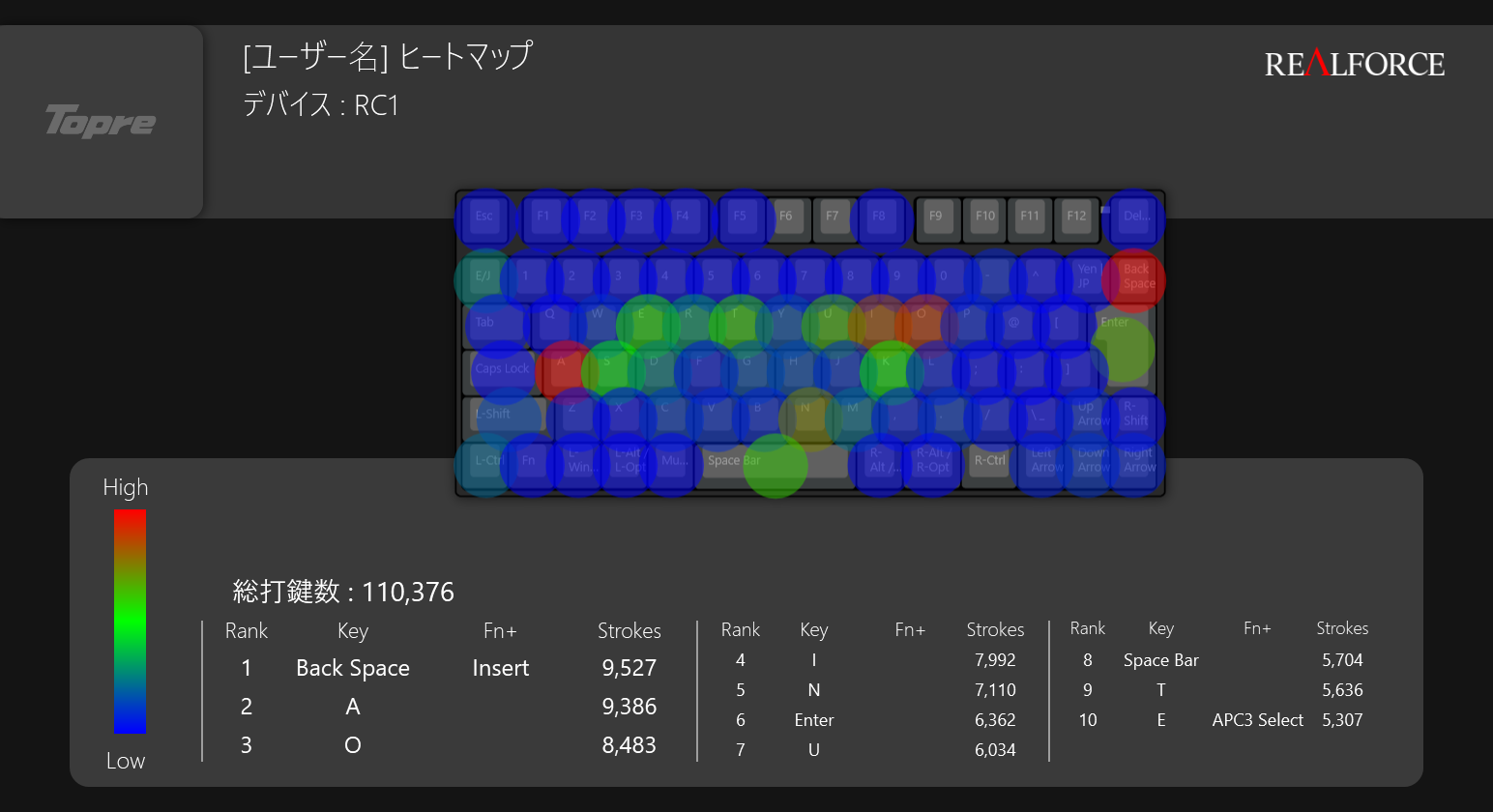
Top 10
| Rank | Key | Count | Share |
|---|---|---|---|
| 1 | Backspace | 9,527 | 8.6% |
| 2 | A | 9,386 | 8.5% |
| 3 | O | 8,483 | 7.7% |
| 4 | I | 7,992 | 7.2% |
| 5 | N | 7,110 | 6.4% |
| 6 | Enter | 6,362 | 5.8% |
| 7 | U | 6,034 | 5.5% |
| 8 | Space | 5,704 | 5.2% |
| 9 | T | 5,636 | 5.1% |
| 10 | E | 5,307 | 4.8% |
Backspace took #1 with 9,527 presses, while A came in at #2 with 9,386. The gap was just 141 — virtually tied.
In my initial 30-minute data, A was #1 (889) and Backspace was #2 (835). So A was winning at first, but Backspace overtook it after a week. I should be getting more used to the keyboard by now, yet Backspace usage increased. This can't be explained by "just getting used to it."
What 8.6% Backspace Really Means
Research on English typing shows that trained typists have an error correction rate of about 5.9%, and untrained typists about 6.5%. My 8.6% is, well, high.
But I don't think this is simply a story of "making lots of typos."
I type Japanese using romaji input and mix in English. This environment has an error structure that pure English typing simply doesn't have.
The "Three Layers" of Japanese Typing Errors
English typos are simple. Your finger hit the wrong key. That's it.
Japanese is different. Backspace gets consumed across three distinct layers.
Layer 1 is universal. Your finger slipped; you hit the adjacent key. This happens to English typists too.
Layer 2 is specific to people who switch between English and Japanese. You want to type English, but the IME is still active, and hiragana appears instead. Or you want to type Japanese, but the IME is off and you get raw English characters. This type of error simply cannot occur in an English-only environment.
Layer 3 is the trickiest. Kanji conversion errors. Japanese has many homophones — like 橋 (bridge), 箸 (chopsticks), and 端 (edge) — all pronounced "hashi." If you carefully checked every conversion, your speed would tank, so you accept some errors and keep going. Then you catch them later while rereading. When you fix these, you're not just deleting one character — you often delete multiple words worth of text and retype, making the Backspace count per error significantly higher than for English typos.
English doesn't have Layers 2 and 3. Japanese having a higher Backspace rate is structurally inevitable.
I looked for research data to back up this hypothesis, but couldn't find anything on the specific topic of "Backspace usage rates among Japanese-English bilingual typists." Research on Japanese typing itself seems scarce compared to English. Perhaps because IME adds so much complexity that even defining what counts as an "error" becomes difficult.
Space at #8 — A Japanese Typing Signature
Another interesting finding: the Space key ranked #8 at just 5.2% of all keystrokes.
In English typing, Space typically accounts for over 10% of all keystrokes, easily claiming the #1 spot. Japanese doesn't use spaces between words, so it's roughly half. Obvious when you think about it, but striking when you see it in the data.
Then there are the vowels. A (#2), O (#3), I (#4), U (#7), E (#10) — all five vowels made the top 10. In romaji input, every consonant is followed by a vowel, so vowel frequency is dramatically higher than in English. In English, only 'E' typically ranks near the top; the other vowels don't stand out as much.
This is the "fingerprint" of Japanese romaji input.
Would a Smarter IME Fix This?
Layer 3, the kanji conversion errors — could a smarter IME reduce them? I did some research.
ATOK — The Veteran of Contextual Understanding
ATOK has an AI/deep-learning-powered conversion engine, and its context-dependent accuracy is currently the most mature in the market. There are cases where it correctly handles conversions that Google Japanese Input or MS IME get wrong.
However, an engineer's daily typing consists of short bursts: code, comments, Slack messages, prompts, documentation. ATOK's contextual understanding shines with longer prose, so the benefits for engineers may be limited. On the other hand, Google IME is strong with tech terms and new library names since its dictionary is based on web data.
There's also the subscription cost. Whether it's worth paying an annual fee just to slightly reduce your Backspace count is questionable.
azooKey — Neural Kana-Kanji Conversion
An interesting newcomer is azooKey. It features "Zenzai," a neural kana-kanji conversion engine that was accepted into the IPA Exploratory IT Human Resources Project (Mitou). In evaluation tests, the classical kana-kanji engine (azooKey's baseline) scored 56 out of 150 questions correctly, while Zenzai improved this to about 100 correct answers.
However, the Windows version is currently under development with no stability guarantees, and CPU-only backend performance is very slow — you need a GPU (CUDA or Vulkan). It's not ready for production work yet. The macOS version seems to have a good reputation, though.
LLM-Powered IME — Dream vs. Reality
Fundamentally, LLMs are extremely well-suited for Japanese predictive conversion. Type Japanese into ChatGPT and it reads context beautifully to produce correct conversions.
But that's not the problem.
What an IME requires: "always-on, instant response, low overhead." What LLMs offer: "high compute, large scale, GPU-dependent." These are fundamentally incompatible.
Response speed really matters. Hitting Backspace to correct an error takes less than 0.1 seconds, but if every conversion introduced hundreds of milliseconds of latency, it would break your train of thought. Adding input stress defeats the purpose.
As NPU-equipped PCs become more common, local neural IMEs might become practical. But not today.
The Current Best: Google IME + Fast Backspace
After laying all this out, I realized my current workflow is actually surprisingly well-optimized:
- Accept some conversion errors and keep typing at full speed
- Hit Backspace immediately when you notice a mistake
- Realforce's light key feel makes Backspace mashing effortless
Rather than improving conversion accuracy, reducing the cost of error correction is less stressful. The Realforce's electrostatic capacitive switch mechanism is doing the heavy lifting here.
Instead of "make fewer mistakes," the strategy is "recover from mistakes faster." When you think about it, the speed from "noticing a mistake to completing the correction" is more directly linked to real productivity than the number of typos themselves.
Testing "Even Faster Backspace" with APC
The Realforce has a feature called APC (Actuation Point Changer) that lets you customize the actuation point for each key. Since I can collect heatmap data, I decided to take a data-driven approach to tuning.
The Default Was 2.2mm
Here's something I learned for the first time: the default is not 0.8mm but 2.2mm. The RC1 has four levels (0.8mm / 1.5mm / 2.2mm / 3.0mm), and the factory setting is 2.2mm.
APC doesn't change the key weight (spring resistance). The weight is the same 45g whether set to 0.8mm or 2.2mm. What changes is "how deep you need to press before the keystroke registers."
So switching to 1.5mm means: you start pressing with the same feel as before, but it registers at the 1.5mm point instead of waiting for 2.2mm. Since the physical feel of the key itself doesn't change, the adjustment should feel less jarring than expected.
Starting with a Uniform 1.5mm
Rather than going straight to 0.8mm for everything, I'm taking a gradual approach.
The RC1 can save multiple APC profiles, so I'm keeping the default 2.2mm profile while switching to a 1.5mm profile for a week. If it doesn't work out, I can switch back instantly.
I really want to try a custom configuration like "0.8mm for Backspace and vowel keys, 2.2mm for everything else," but first I'll establish a baseline with a uniform change.
After one week, I'll pull the heatmap and compare whether the Backspace share changes from 8.6%. A proper A/B test, engineer-style.
Next Up
- Does APC at 1.5mm change the Backspace rate?
- Do miskeys increase or decrease?
- Effect of per-key settings (0.8mm only for frequent keys)
Looking forward to the data in a week.

Was this article helpful?

If this article helped you organize your thoughts
a coffee-sized support would be much appreciated.
※ This is separate from tipping, but—
If you'd like to organize similar themes in your own context, I also offer dialogue sessions as a form of thought organization.
Recommended for you