
The Mystery of Jenkins Agents Slowing Down After One Hour — It Was Network Burst Credits, Not CPU
First Suspect: CPU Credits
I've been running Jenkins agents on AWS spot instances (t-series), and noticed that builds would suddenly become sluggish about one hour after launch.
CPU and memory were both fine — so why was it slow?
My first instinct was to check CPU credits, but as I dug deeper, I realized: "Oh, it's the network." Here's how I tracked down the root cause.
Since I was using t-series instances, CPU credit exhaustion was the obvious suspect. Even though I had unlimited mode enabled, I decided to check the credit balance — and that's what kicked off the investigation.
Checking CPU Credit Balance via CLI
#!/bin/bash
# Get instance ID and region via IMDSv2
TOKEN=$(curl -s -X PUT "http://169.254.169.254/latest/api/token" \
  -H "X-aws-ec2-metadata-token-ttl-seconds: 21600")
INSTANCE_ID=$(curl -s -H "X-aws-ec2-metadata-token: $TOKEN" \
  http://169.254.169.254/latest/meta-data/instance-id)
REGION=$(curl -s -H "X-aws-ec2-metadata-token: $TOKEN" \
  http://169.254.169.254/latest/meta-data/placement/region)

# Get CPU credit balance
CREDIT=$(aws cloudwatch get-metric-statistics \
  --region $REGION \
  --namespace AWS/EC2 \
  --metric-name CPUCreditBalance \
  --dimensions Name=InstanceId,Value=$INSTANCE_ID \
  --start-time $(date -u -d '10 minutes ago' +%Y-%m-%dT%H:%M:%SZ) \
  --end-time $(date -u +%Y-%m-%dT%H:%M:%SZ) \
  --period 300 \
  --statistics Average \
  --query 'sort_by(Datapoints, &Timestamp)[-1].Average' \
  --output text)

echo "Instance: $INSTANCE_ID / CPU Credit Balance: $CREDIT"
Noticing CPUSurplusCreditBalance Climbing
On macOS, replace
date -u -d '10 minutes ago'withdate -u -v-10M.
Looking at CloudWatch, CPUSurplusCreditsCharged was nearly zero, but CPUSurplusCreditBalance was gradually increasing.
I panicked for a moment — "Am I being charged for this?" — but after sorting it out, here's what was happening:
CPUSurplusCreditBalance rising
  → "Debt" accumulating from continuous bursting in unlimited mode

CPUSurplusCreditsCharged = 0
  → No repayment or charges incurred yet
CPUSurplusCreditsCharged only kicks in when earned credits can't repay the "debt," or when the instance terminates. At this point, the instance was simply "running on borrowed credits" — not a problem.
Watch Out When Spot Instances Terminate
One thing to be aware of: when a spot instance is suddenly terminated, the remaining CPUSurplusCreditBalance is immediately charged as CPUSurplusCreditsCharged.
That said, the cost impact is quite small. Here's the math:
1 vCPU-hour = 60 credits = $0.05
→ 1 credit ≈ $0.00083
The CPUSurplusCreditBalance cap for a t3.medium is 576 credits (24 credits/hour × 24 hours). Even if you max it out: 576 × $0.00083 ≈ about 48 cents. Not exactly a cost explosion. So CPU credits weren't the main culprit here.
EBS I/O Credit Exhaustion? Not Quite…
Next, I suspected EBS I/O credit exhaustion. gp2 volumes have burst credits similar to CPU credits, and Jenkins builds are I/O-heavy with all the dependency downloads and compilation.
But when I checked, the EBS volumes were gp3. gp3 uses provisioned IOPS rather than a credit-based system, so I/O credit exhaustion wasn't relevant. Another dead end.
The "Aha" Moment: NetworkOut Graph
Stuck, I started browsing CloudWatch metrics and pulled up the NetworkOut graph. There it was — a sharp drop roughly one hour after launch.
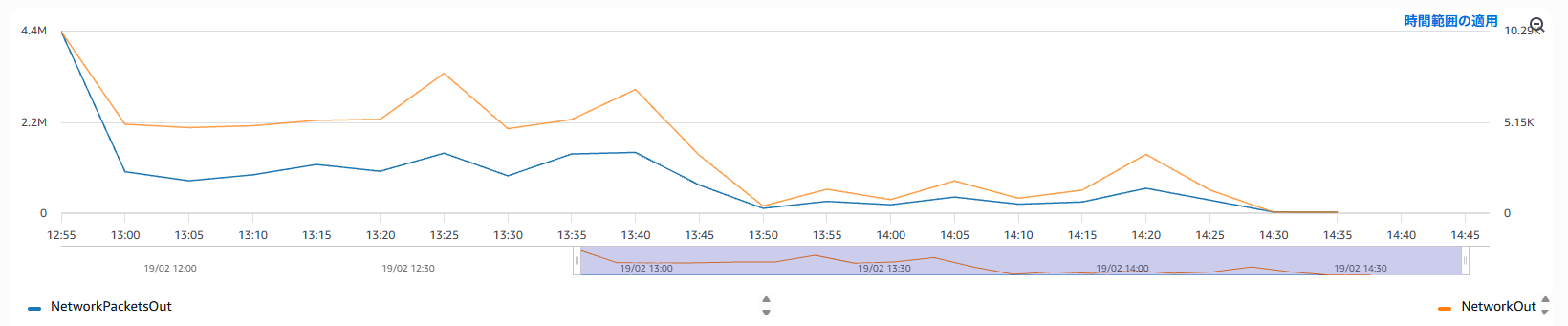
NetworkPacketsOut (packet count) dropped at the same time. When even the packet count drops, it's a strong sign of bandwidth credit exhaustion.
T-Series Instances Have Network Burst Credits Too
I didn't know this, but t-series network bandwidth follows the same burst model as CPU:
Right after launch
  → Network burst credits are full
  → Can use maximum bandwidth (up to 5 Gbps for t3.medium)

~1 hour later
  → Credits exhausted
  → Throttled to baseline bandwidth (~256 Mbps for t3.medium)
Jenkins agents consume a lot of network bandwidth right after startup — pulling Docker images, downloading dependencies. This drains the credits quickly, and subsequent builds get throttled. It perfectly explains the "CPU and memory are fine but everything is slow" symptom.
Unlike CPU Credits, There's No Setting to Fix This
CPU credits have unlimited mode — even after credits are exhausted, you can keep bursting (at a small cost). So I wondered: "Can I do the same for network?" Turns out, there is no unlimited equivalent for network burst credits.
| CPU Credits | Network Credits | |
|---|---|---|
| Unlimited mode | ✅ Available | ❌ Not available |
| Mitigated by upsizing | ✅ | ✅ |
| User-configurable | ✅ | ❌ |
This is a fixed parameter determined by the instance type — users cannot change it.
Countermeasures Under Consideration
Now that the root cause is identified, here are the countermeasures I'm considering, in order of priority:
1. Cache dependencies and Docker images
Reduce the burst of network traffic right after launch to delay credit exhaustion. No additional cost, so this is where I'll start.
2. Upsize the instance
A larger instance type has higher baseline bandwidth, making it more resilient after credits run out. Need to balance against spot pricing.
3. Switch to m-series or c-series
Eliminates network burst credits entirely — a fundamental fix. But spot pricing will be higher.
If you're using disposable Jenkins agents that launch fresh for each build, caching is probably the most cost-effective solution. I'll write a follow-up once I've implemented it.
References: AWS Documentation
| Topic | URL |
|---|---|
| Burstable performance instances overview | https://docs.aws.amazon.com/AWSEC2/latest/UserGuide/burstable-performance-instances.html |
| CPU credits basic concepts | https://docs.aws.amazon.com/AWSEC2/latest/UserGuide/burstable-credits-baseline-concepts.html |
| Unlimited mode concepts | https://docs.aws.amazon.com/AWSEC2/latest/UserGuide/burstable-performance-instances-unlimited-mode-concepts.html |
| Unlimited mode with spot instances | https://docs.aws.amazon.com/AWSEC2/latest/UserGuide/burstable-performance-instances-unlimited-mode.html |
| EC2 network bandwidth (includes burst credit info) | https://docs.aws.amazon.com/AWSEC2/latest/UserGuide/ec2-instance-network-bandwidth.html |
Recommended Books
If you want to deepen your understanding of AWS instance operations and infrastructure fundamentals, these books are great references.

Was this article helpful?

If this article helped you organize your thoughts
a coffee-sized support would be much appreciated.
※ This is separate from tipping, but—
If you'd like to organize similar themes in your own context, I also offer dialogue sessions as a form of thought organization.
Recommended for you